


HeyStar
4.3121.00 Reviews
App Specs
- Version
- 1.5.0
- Updated On
- License
- Free
- Downloads
- 100,000+
- Developer
- Chongqing Cuyi Technology Co., Ltd.
- Categories
- Tools
- Platform
- Android
Screenshots
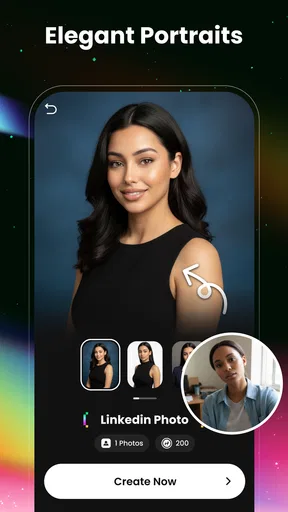
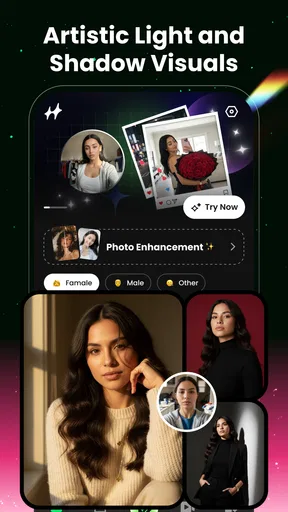
 Analysis by AppCompare
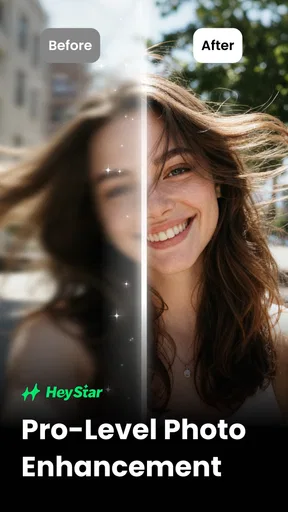
When I try an AI photo enhancer, I’m not only asking whether it can make an image look sharper. I also want to know what choices I have before I hand it a personal photo, and whether its role is clear enough for me to use it comfortably. HeyStar is a free photo-enhancement tool from Chongqing Cuyi Technology Co., Ltd., and that makes it a very different kind of app from the celebrity-fan platform its name might suggest. Its focus is improving pictures with AI, not streams, fan clubs, or direct contact with public figures.
What to expect from a photo enhancer
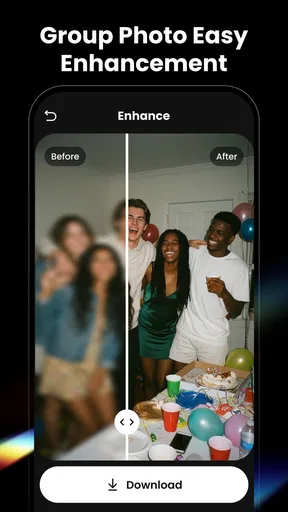
I’d approach HeyStar as a practical editing tool for a picture that needs a lift, rather than as a full photo studio. AI enhancement apps are most useful when they reduce the effort between choosing an image and getting a version that is easier to share or keep. They are less suited to someone who wants precise control over every adjustment, a layered workflow, or a complete set of manual editing tools.
That distinction matters because “enhance” can mean different things to different people. A light improvement to an older family snapshot is not the same task as preparing a carefully color-graded portrait. I would judge the result by whether it still looks like the person and moment in the original, not simply by whether it appears crisper. When an automated edit smooths away texture or changes small details, a technically cleaner image may feel less authentic.
Trust starts with clear choices
HeyStar is listed as a Tools app and carries an Everyone age rating. It has a 4.3 average from around 1.1 thousand ratings, with over 100 thousand installs. That gives a prospective user a sense of its broad reach, but popularity alone is not a privacy guarantee. With an image tool, I think it is sensible to consider what you are choosing to upload and to review the app’s visible permission and account options on your own device before using it.
I would be especially careful with photos that contain more than the subject I intend to edit. A family picture might show children, a home interior, a school logo, or a document in the background. Cropping to the relevant area before selecting an image is a simple way to avoid sharing extra details unnecessarily. For a casual profile picture, that may be an easy trade-off; for an image with sensitive personal information, I would pause and decide whether an AI enhancement app is the right place to process it at all.
Controls worth checking before you begin
I can’t assume a particular permission, account setting, or data-handling option exists unless it is visible in the app, so I would check those details directly rather than treating an enhancer’s purpose as proof of how it handles images. On first use, pay attention to any prompts and read what each one is asking for before allowing access. If the app offers a photo picker, selecting one image at a time is a more limited choice than granting broad access to a whole library.
The same careful approach applies after editing. Look for the app’s own save, share, and account controls, and choose only the action you actually need. If you only want a copy on your phone, there is no reason to share the result elsewhere as part of your workflow. These small decisions keep the experience more deliberate without turning a quick edit into a complicated process.
Worth Reading Before You Choose

Flipboard Shows What News Apps Must Do Beyond the Feed

Switching to Android Auto Means Rethinking Your Driving Routine

Google Calendar Makes a Crowded Week Easier to Manage

Ludo King Makes the Most of the Minutes Between Plans

Baby Panda World Brings Quick Play to Modern Phones, but Its Game Library Feels Busy

ESPN’s Live Game View Makes Following Close Games Easier
Where this kind of AI editing helps—and where it doesn’t
A useful everyday case is finding an old photo for a family message and noticing that the image looks soft on a modern screen. I would try an enhancer on a copy, compare it with the original, and keep whichever version feels more natural. That comparison is important: AI can make an image look more polished, but it cannot recover every detail that was never captured, and an overly strong result can introduce a synthetic look.
For a fast social post or a modest improvement to a personal picture, an automated tool can be more convenient than opening a full editor and adjusting several controls. If I were preparing a portfolio image, retouching a product photo where exact colors matter, or editing a picture that must remain faithful to the source, I would favor a manual editor and inspect the result closely. Convenience is the strength of this category; fine-grained control is usually its trade-off.
Pricing and practical expectations
The app is free to download, while in-app purchases range from $3.99 to $189.99 per item. I would check the price shown for any purchase in the app before confirming it and decide whether the feature is worth paying for based on my actual use, not on the promise of a dramatic transformation. A one-off need may not justify spending much, while someone who regularly works with photos may judge the value differently.
HeyStar is at version 1.5.0, was released on October 26, 2025, and requires Android 9 or later. Those details make it easier to check basic compatibility before installing, but they don’t tell me how a particular phone will handle a given image or how much editing control I’ll want. I’d start with an ordinary, non-sensitive photo and inspect the output before deciding whether to make the app part of a regular routine.
Getting Started with HeyStar
First things first, downloading HeyStar is a breeze. Available on both iOS and Android, the app’s user-friendly interface ensures you’re set up in no time. Once installed, you’re greeted with a sleek, intuitive layout that makes navigation a cinch. It’s like the app is giving you a warm welcome to the world of glitz and glamour.
Creating an account is straightforward. You can sign up using your email or social media accounts, making the process as painless as possible. Once in, you can start customizing your profile. Here’s where the fun begins! Choose your favorite stars to follow, and the app will tailor your feed to ensure you never miss a beat from your idols.
Discovering Content
The main draw of HeyStar is its content. From live streams to behind-the-scenes footage, the app is a treasure trove of exclusive material. The live streaming feature is particularly impressive. It’s like having a backstage pass to your favorite concerts or events, all from the comfort of your couch.
But it's not just about passive watching. During live streams, users can interact with celebrities through chat, send virtual gifts, and even get a shoutout from stars. It’s this level of interaction that sets HeyStar apart from other fan apps. Imagine getting a personal message from your favorite celeb—totally worth the download!
Exclusive Features
One of the standout features is the exclusive content section. Think exclusive interviews, personal vlogs, and sneak peeks at upcoming projects. It’s like getting the insider scoop before anyone else. Plus, the app frequently updates its content, so there’s always something new to explore. No more scouring the internet for the latest celebrity news—HeyStar brings it straight to you.
Another cool feature is the fan community aspect. You can join fan clubs, discuss the latest news, and even plan meetups. It’s a great way to connect with fellow fans and share your mutual love for your favorite stars. The sense of community is strong, making it more than just an app; it’s a social platform.
User Experience
In terms of performance, HeyStar runs smoothly. The videos load quickly, and the live streams are of high quality. Plus, the app’s notifications ensure you’re always in the loop, without being too intrusive. It’s clear that a lot of thought has gone into making the user experience as seamless as possible.
One thing I appreciate is the customer support. Whether you have a question about a feature or run into an issue, the support team is responsive and helpful. It’s little touches like these that make using the app a pleasure.
Why You Should Download HeyStar
If you’re a fan of staying connected with celebrities or just curious about the latest in the entertainment world, HeyStar is worth checking out. It offers a unique blend of content and interaction, making you feel closer to the stars you love. Plus, the community aspect adds an extra layer of engagement, ensuring you’re never just a spectator.
So, are you ready to step into the spotlight? Download HeyStar today and start living the star-studded life you’ve always dreamed of. Whether you’re there for the live streams, exclusive content, or the vibrant community, there’s something for every fan to enjoy. Give it a try and see why so many are raving about it!
Pros
- User-friendly interface for easy navigation.
- Extensive library of content available.
- High-quality video streaming.
- Customizable user profiles.
- Regular updates with new features.
Cons
- Occasional buffering issues.
- Some content is region-locked.
- Limited offline viewing options.
- In-app purchases can be pricey.
- Requires a stable internet connection.
FAQs for HeyStar
What is HeyStar and what features does it offer?
HeyStar is a social networking app designed to connect fans with their favorite celebrities. It offers features such as live streaming, fan forums, exclusive content, and direct messaging with stars. Users can follow the latest updates, participate in fan events, and even purchase exclusive merchandise directly through the app.
Is HeyStar free to use, or does it require a subscription?
HeyStar is free to download and use, but it offers in-app purchases and subscription models for accessing premium features. These may include exclusive celebrity content, ad-free browsing, and special event access. Users can choose to subscribe monthly or annually, depending on their preferences.
How secure is my personal information on HeyStar?
HeyStar takes user privacy seriously and employs advanced encryption to protect personal information. The app requires only necessary data during registration and offers various privacy settings to control who can see your profile and interactions. Regular updates ensure that security protocols are up to date.
Can I connect with celebrities directly through HeyStar?
Yes, HeyStar allows users to connect with celebrities through live streams and direct messaging. While not all celebrities may be available for direct interaction, many offer scheduled Q&A sessions and live events where fans can engage with them in real time. This feature enhances the personal connection between fans and stars.
Is HeyStar available on both Android and iOS platforms?
HeyStar is available for download on both Android and iOS platforms. The app is optimized for various devices, ensuring a seamless user experience across different operating systems. Updates are regularly released to enhance functionality and compatibility with the latest devices.


